24/7 Accessibility Monitoring for Digital Accessibility
Continuous testing, clear reports, and a genuine user perspective for sustainable accessibility
With our managed service, we ensure that digital offerings are stably accessible – for all users, at all times.
What is Accessibility Monitoring with Accessibility Cloud?
Accessibility monitoring with Accessibility Cloud means that digital offerings—websites and linked documents—are periodically and automatically checked for accessibility issues. The tool performs automatic scans, monitors developments over time, detects new and resolved errors, and provides clear, prioritized error messages. Criteria such as page URLs, documents, user authentication (pages behind login), as well as filters and exclusions (e.g., specific content, HTML selectors, iframes) can be precisely controlled. In addition to automatic tests, Accessibility Cloud also offers manual or „intelligently guided“ tests, enables the generation of accessibility statements, and supports multiple compliance goals such as WCAG, EN 301 549, and BITV.
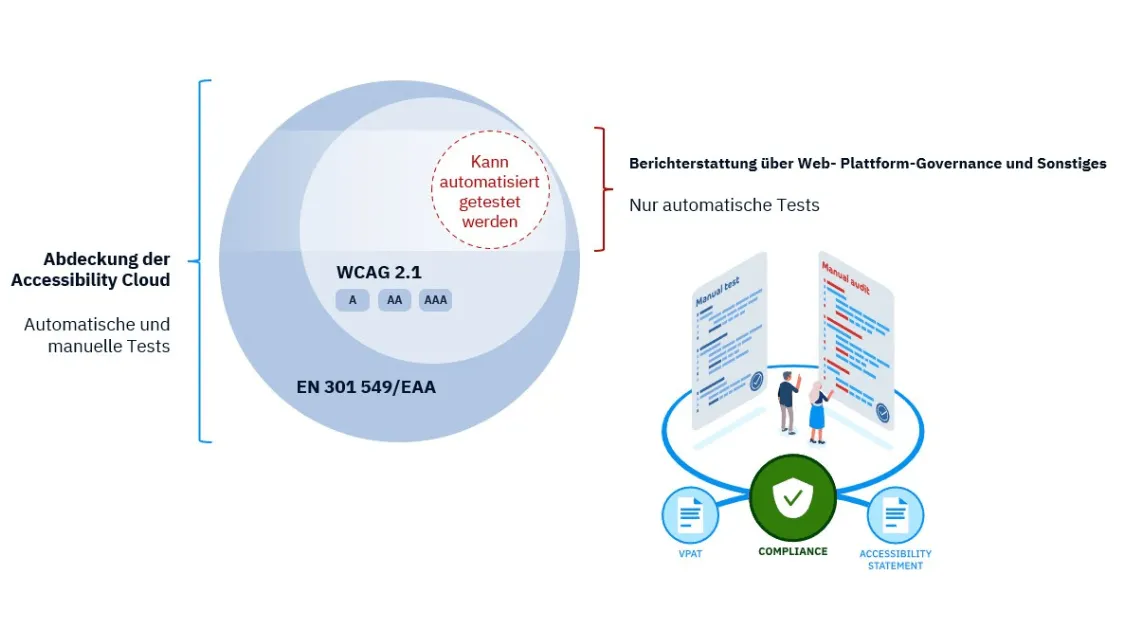
What monitoring is good for and how Accessibility Cloud supports it
Monitoring ensures that the current state of accessibility is constantly being tracked. For example, by showing error changes over time, notifying about new issues, and comparing scans at different points in time. This makes it clear whether and how quickly improvements are being implemented. Accessibility Cloud complements this with suggested solutions—partly automated by AI („ACAI“)—and learning materials, so that even less experienced individuals can understand what a fix might look like. Additionally, the tool offers quality checks (e.g., broken links, incorrect MIME types, etc.) and role and permission management, enabling different teams (e.g., developers, content managers) to collaborate efficiently.

Tool Focus: Accessibility Cloud
Automated and standards-compliant
The tool combines Automated scans with manual checks According to WCAG, EN 301 549, BITV, etc. It identifies accessibility errors in linked documents and PDFs, outlines error types, affected user groups, and specific solutions. 24/7 monitoring from websites and documents. Errors are monitored – in case of problems, email notifications are sent immediately. For the Compliance Management supports multiple standards (WCAG 2.1/2.2, EN 301 549, EAA, BITV, RGAA, PDF/UA). Workflow for role-based access rights, User Management and integration into processes such as CI/CD. Based on the test results, the tool automatically generates accessibility statements and compliance declarations. The Multilingual interface is available in German, English, French, Spanish, Danish, Dutch, Swedish, Finnish, Norwegian, and Italian, among other languages.
