Accessible PDFs: Digital Documents for Everyone
Accessibility, Structure, and Inclusion – How PDF/UA Improves Digital Participation
Accessible PDFs are digital documents that are accessible to everyone, regardless of physical, sensory, or cognitive limitations. They enable unimpeded use by assistive technologies such as screen readers, braille displays, or voice control. To achieve this, a clear structure, easily readable content, and intuitive navigation are essential. This not only promotes digital inclusion but also complies with legal requirements such as EU Directive 2016/2102 or the Accessibility Strengthening Act (BFSG).
A central standard for accessible PDFs is PDF/UA (Universal Accessibility), defined in ISO 14289-1:2016. This standard specifies the technical requirements that must be met for a PDF to be considered accessible. These include correctly structured tags that make content accessible to screen readers, as well as a clear separation of content and layout. PDF/UA is based on the Web Content Accessibility Guidelines (WCAG) and ensures that digital documents comply with both legal and technical accessibility standards. Compliance with this standard can be verified using tools such as the PAC Tool (PDF Accessibility Checker).
Accessible PDFs are far more than a legal obligation – they represent inclusion, responsibility, and professionalism. Companies, authorities, and educational institutions should implement the standard to enable all people to access digital information while simultaneously meeting legal requirements. Accessibility creates added value for everyone.
Is your PDF file accessible?
Find out now with just a few clicks – simply upload and let us analyze it.

Manual revision according to PDF/UA standard
Holistic Services from Analysis to Training
Individual needs assessment to clarify target groups, document types, and technical requirements – as a basis for perfectly tailored services. Technical implementation according to PDF/UA through structuring with tags (e.g., headings, lists, paragraphs), alternative text for images, navigation (table of contents, links) – ideal for assistive tools. The Target audience, users with disabilities also test the created documents with screen readers or Braille displays – feedback is incorporated into quality assurance. A Professional handover & training means the handover includes documentation for PDF/UA compliance and optional training for sustainable use of accessible PDFs.
Automated creation with axesFlip
Scalable, efficient, and seamlessly integratable
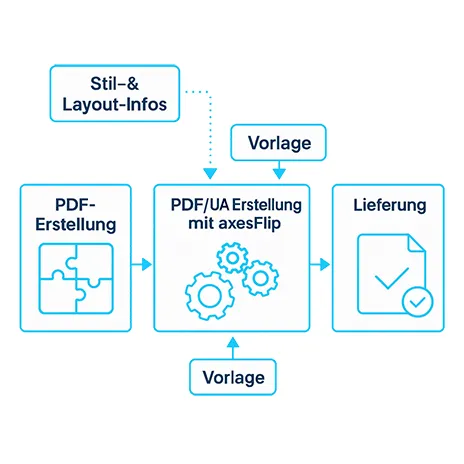
For the High-Volume Compatibility axesFlip enables the fully automated conversion of large volumes of documents into accessible PDFs—without changing existing workflows. The Compliance with legal standards is guaranteed by structuring with tags (e.g., headings, lists, paragraphs), alternative text for images, navigation (table of contents, links) – ideal for assistive tools. Template-based flexibility Once set up, flexible templates can be used for different document types – scalable and efficient. Seamless system integrations possible via REST-API - axesFlip optimally adapts to existing PDF processes.
Advantages at a glance
This is how collaboration works
Service Contract (Automated + Manual) for Continuous Need.
Select service package
Automated: Integration axesFlip, template customization, workflow setup.
Implementation & Production
Handover & Training
Optional: Service Agreement
Accessibility Strengthening Act (BFSG)
What must document management be prepared for?

 German
  English